Looking for a vinyl cutting machine for stickers that’s easy to use and delivers precise cuts? This guide highlights five top options that balance AI-assisted design, connectivity, and durability. Best for crafters, teachers, small studios, and party planners who want fast, dependable results without a heavy learning curve. The overview table below helps you compare core specs at a glance.
| Product | Best For | Key Benefit | Note |
|---|---|---|---|
| Likcut S41 | Beginner to intermediate crafters | Ultra-precise 0.2mm tolerance | 3-step workflow simplifies setup |
| Likcut Glee S501 | Voice-to-design lovers | AI image generation and 46+ materials | Great for kids’ projects and classrooms |
| Likcut S501 (standard) | Students and home projects | Fast, reliable Bluetooth/USB | Front cover storage keeps tools handy |
| VEVOR 28 Inch | Small studios needing big sheet capacity | Large cutting area with strong motors | Software compatibility noted |
| Brother ScanNCut SDX85C | Art projects with scanning needs | Built-in scanner for turning drawings into cuts | 251 built-in patterns included |
Likcut S41 Vinyl Cutter Machine
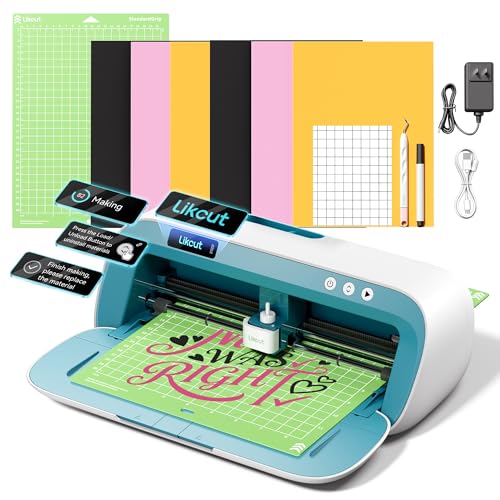
Best for: Beginners and hobbyists who want straightforward operation with reliable precision. The S41 emphasizes a simple 3-step workflow, removing redundant steps to speed up sticker production. It uses a sensor-driven algorithm system to calibrate cutting paths, aiming for stable control and 0.2mm accuracy. This makes it suitable for room decor decals, basic HTV projects, and small batch stickers. A potential limitation is that it relies on the app interface for most workflows, so users who prefer traditional software may acclimate slowly.
Likcut Glee S501 AI Image Generator Cutter

Best for: Creators who want voice- or text-to-design capabilities. The Glee S501 supports AI-powered design generation and can cut over 46 materials, including vinyl, cardstock, and iron-on transfers. It’s ideal for personalized party favors, school projects, and family craft days. Caution: AI-generated designs may require quick adjustments before cutting to ensure clean edges on intricate pieces.
Likcut S501 AI Smart Sticker Maker

Best for: Crafters who want quick setup and steady connectivity. The S501 offers Bluetooth 5.0 and USB 2.0 for reliable connections, plus a built-in front-cover storage to keep tools organized. It’s well-suited for school projects, home décor, and classroom use. Limitation: Some advanced features may require firmware updates or usage with Likcut’s companion app for best results.
VEVOR 28 Inch Vinyl Cutter Bundle

Best for: Small studios needing a large-capacity cutting area. The 28-inch cutting width offers substantial sheet handling, with adjustable pressure and speed to fit different materials. It includes Signmaster software compatibility for design and cut workflows. Caution: Some users report setup and software integration may require time to master, especially with Windows configurations.
Brother ScanNCut SDX85C
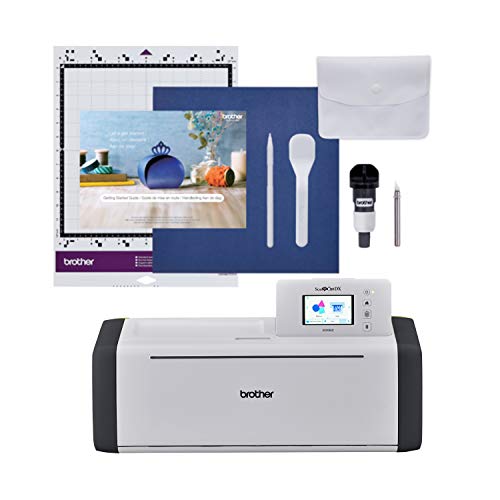
Best for: Crafters who want an integrated scanner to convert drawings into cut files. The SDX85C ships with 251 built-in patterns and offers a 3.5″ touchscreen for straightforward design tweaks. It can cut printed stickers and appliques with precise registration. Limitation: Built-in scanner adds cost and may require more learning time than basic plotters for users who don’t need scanning capabilities.
Buying Guide: Key Considerations For Your Sticker-Cutting Setup
- What will you primarily cut? Consider material types (vinyl, cardstock, iron-on transfers) and the maximum width you’ll need.
- Do you want AI-assisted design or simple traditional workflows? AI features speed up idea generation but may require adjustments before cutting.
- Connectivity: Is Bluetooth, USB, or wired stability most important for your workspace?
- Calibration and accuracy: Look for a machine with a tight cutting tolerance (0.2mm or better) and reliable calibration.
- Workspace and storage: Front-cover storage and compact designs help keep tools organized in tight spaces.
- Software and compatibility: Check whether included software works with your computer operating system and offers basic templates or patterns.
FAQ
- What is a vinyl cutter best used for?
A vinyl cutter is used to produce precise cuts on vinyl and other materials to create stickers, decals, cards, and decor items. It’s ideal for home decor, party favors, and small business packaging designs.
- Do AI-powered cutters require advanced design skills?
Not necessarily. AI features can translate voice or text prompts into cut-ready designs, reducing the learning curve for beginners while offering fast workflows for seasoned crafters.
- Which cutter is best for classroom use?
Models with built-in storage, simple interfaces, and safe operation tend to work well in classrooms. The ability to handle multiple materials and quick setup aids group projects.
- Is Bluetooth enough for reliable cutting?
Bluetooth is convenient, but USB or wired connections can offer more stable performance during long-cut sessions or when working with larger files.
- What materials can these machines cut besides vinyl?
Most can cut cardstock, iron-on transfers, transfer vinyl, and some specialty mats. Advanced models may support matless smart materials or wood-free alternatives depending on blade strength and settings.