Looking for the best tracing machine for drawing to help kids or beginners learn, sketch, and express creativity? This guide highlights five practical options, each chosen for clear projection, safe use, and kid-friendly features. Whether you want a projector-based tracing toy or a light box for precise tracing, these picks suit beginners, students, or hobbyists who want reliable, simple tools to turn ideas into art.
Summary table of selected products
| Product | Best For | Why Pick It |
|---|---|---|
| Flycatcher Smart Sketcher 2.0 Projector | Kids ages 5+ | App-enabled, large content library, step-by-step tutorials |
| LitEnergy A4 LED Copy Board | Portable tracing on the go | Ultra-thin, adjustable brightness, A4 work area |
| AI Drawing Projector for Kids | Beginner to intermediate | Turn photos into drawings, AI-assisted creativity |
| Bawaslom A4 Light Box | Outdoor or studio use | Rechargeable 4000mAh battery, 3 colors & 6 brightness levels |
| SuFly Tracing Paper 100 Sheets | Traditional tracing practice | Reliable translucent vellum for overlays and tracing |
Each product below shows how to maximize tracing for drawing, with notes on who it’s best for and any important limitations. Consider your workspace, portability needs, and whether app or offline use matters most for your use case.
Flycatcher Smart Sketcher 2.0 Projector

The Flycatcher Smart Sketcher 2.0 is a dedicated drawing projector designed for kids and beginners. It projects images to trace and offers step-by-step tutorials, with customizable options that support personal expression. It’s best for young learners who benefit from guided projects and a built-in content library. A key strength is app connectivity, which unlocks additional drawings and interactive tutorials. Strong caution: ensure supervision for screen time and Bluetooth pairing to avoid connectivity issues. This model is well-suited for early art education and family creative activities.
LitEnergy A4 LED Copy Board

The LitEnergy A4 LED Copy Board offers a slim, portable tracing solution with adjustable brightness. It’s ideal for artists who need a lightweight, reliable light source for tracing on A4-sized work surfaces. Best for students, hobbyists, or professionals who value a low-profile pad that fits into backpacks or desks. The device uses flicker-free LED illumination to reduce eye strain during longer sessions. Limitation: larger, more complex projects might require a bigger or more feature-rich system, and the cutout framing may affect very small tracings.
AI Drawing Projector for Kids (Yoturetoys)
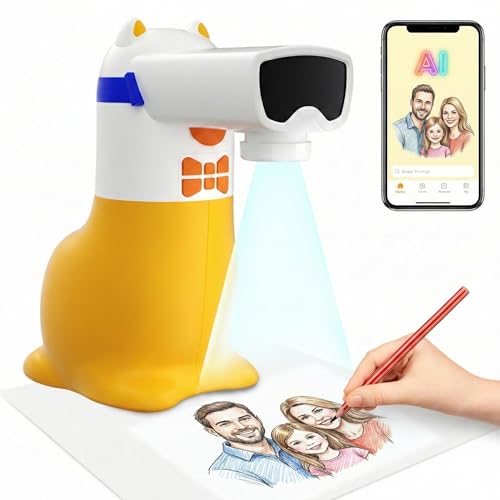
This AI-assisted projector helps children turn photos into drawings, offering an engaging way to translate ideas into art. It’s best for kids aged 5–12 who enjoy transforming everyday images into sketches and who benefit from guided suggestions and confidence-building features. It plugs in with a USB for power and emphasizes a corded power approach for reliability. A potential limitation is dependence on external content and the need to manage screen-based inputs, which may appeal to parents seeking structured learning rather than pure offline creativity.
Bawaslom A4 Light Box with Stand

The Bawaslom tracing light box combines portability with extended on-the-go use, featuring a 4000mAh battery and a Type-C charging option. It offers three color modes with six brightness levels, delivering up to five hours of cordless use after a short charge. Best for outdoor sketching, travel, or classroom settings where power outlets may be scarce. The product’s strong selling point is its battery-driven performance, although it is essential to ensure the battery remains charged for longer sessions to avoid interruptions.
SuFly Tracing Paper 100 Sheets

The SuFly tracing paper set includes 100 sheets of translucent vellum, sized 8.5 x 11 inches, and 60 gsm. It’s a solid option for traditional tracing practice, overlays, and making preliminary drawings. Best for students, hobbyists, and teachers who want consistent, tear-resistant tracing paper. Limitation: purely traditional tracing without projection features means you’ll rely on a separate light source or projector for tracing, which may add to setup time.
Buying Guide
What should you consider when choosing a tracing machine for drawing?
- Projection vs. tracing light: Do you prefer projecting images to trace or a simple light box for tracing from printed templates?
- Portability: Will you use it at home, school, or on the go? Battery-powered options offer true portability.
- Content and learning features: Are built-in tutorials or app-connected content important for your learner?
- Image quality and adjustments: Look for adjustable brightness, focus, and, if possible, rotation or scaling for precise tracing.
- Power options: USB, battery, or wall power affect where you can work and how long you can work without outlets.
- Safety and suitability: Check for child-friendly materials, non-glare lighting, and simple on/off controls for younger users.
How to choose by user type
- Kids new to drawing: Projects with guided tutorials and easy setup (Flycatcher, AI-based options) help build confidence.
- Students and hobbyists: A4 light boxes with adjustable brightness and stable projection are ideal for longer practice sessions (LitEnergy, Bawaslom).
- Professional or educator needs: Durable boards with reliable power options and larger work areas support classroom use (SuFly paper as a supplement).
Practical setup tips
- Position the projector or light pad on a stable surface, with the tracing material secure to prevent shifting.
- Start with high-contrast images or sheets to learn alignment before moving to complex designs.
- For kids, enable parental controls on apps or devices if applicable, and set short, focused practice sessions.
FAQ
- What is the main difference between a tracing projector and a light box?
– A tracing projector projects an image to trace, usually requiring a surface to project onto, while a light box provides a lit surface for tracing over printed or drawn images without projection. - Is app connectivity necessary for a tracing device?
– Not necessary for basic tracing, but apps can offer additional content, tutorials, and creative ideas that can enhance learning. - Can tracing aids help improve drawing skills quickly?
– They support practice and structure, which can improve control and familiarity with lines, shapes, and composition over time. - Are rechargeable tracing boards reliable for long sessions?
– Rechargeable boards are convenient for portability, but ensure battery life matches your typical session length to avoid interruptions. - Which product is best for beginners?
– A model with step-by-step tutorials and simple controls (like Flycatcher or AI-assisted options) is well-suited for beginners. - Can tracing be used for crafts beyond drawing?
– Yes, many light boxes and projectors support various crafts such as stencil work, diamond art, stenciling, and more depending on their features.