Choosing the right sublimation printer for fabric can transform DIY apparel, mugs, and home textiles into vibrant, durable designs. This guide highlights five top options, balancing print quality, ease of use, and value for makers of all levels. Each product section includes key features to help you compare performance, ink systems, and workflow compatibility for fabric transfers. Whether you’re starting a small business or pursuing a creative hobby, these picks offer reliable results and broad compatibility with popular sublimation papers and design apps.
| Product | Brand |
|---|---|
| Brother Sublimation Printer | Brother |
| Epson SureColor F170 Dye-Sublimation Printer | Johnson Plastics Plus |
| Sublimation Color Printer Starter Bundle | World-Paper |
| A4 Sublimation Printer For Clothes, Transfer Machine | GENERIC |
| Epson SureColor F170 Dye-Sublimation Printer (The Supplierhub) | The Supplierhub |
The selections emphasize printers that work well with fabrics, offering reliable ink delivery, comfortable media handling, and robust support ecosystems. Consider your intended scale, preferred ink system, and the types of fabrics you’ll print on when evaluating these options.
Brother Sublimation Printer

The Brother Sublimation Printer integrates with the Artspira app for easy design import, storage, and on-the-go printing capabilities. Artspira provides a library of over 100 sublimation designs and the option to convert images into poster-style drawings. The workflow is straightforward: create in Artspira, transfer, print, heat press, and finish. A heat press is required for transfers. This setup is suitable for hobbyists and small projects that benefit from mobility and design flexibility.
Epson SureColor F170 Dye-Sublimation Printer – Compact 8.5″ x 11″ Format

Marketed by Johnson Plastics Plus, this model emphasizes authentic Epson ink with a PrecisionCore-based print system and a factory-sealed package. It includes OEM sublimation inks and documentation, backed by full manufacturer support. The printer is designed for textiles, mugs, and other sublimation surfaces, delivering vibrant color and sharp detail. It is a compact option suitable for small studios or home crafts where space is a consideration.
Sublimation Color Printer Starter Bundle

This bundle from World-Paper adds value with 25 sheets of sublimation paper and heat-resistant tape, pairing a SC F170-based printer with essential accessories. The bundle supports 8.5″ x 11″ transfer work, providing an efficient starting point for those migrating into fabric sublimation. The included paper helps streamline initial testing and production, particularly for small runs and custom apparel projects.
A4 Sublimation Printer For Clothes, T-Shirt Transfer Printing
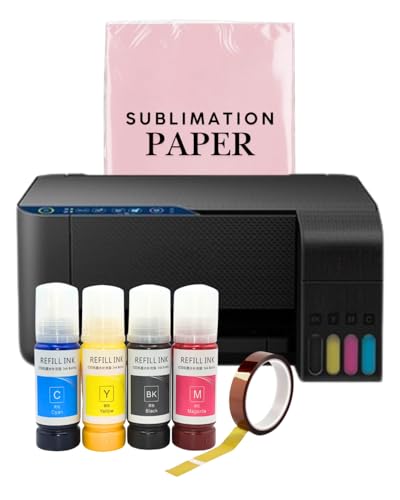
This generic A4 sublimation printer combines wireless operation with a super-tank system to avoid cartridge changes. It ships with a complete ink set (C/M/Y/B) and accompanying transfer paper and tape. The auto-fill nozzle is designed to reduce mess during refills, supporting a clean workflow for small-batch fabric transfers and apparel printing. Suitable for users who want an all-in-one printing and transfer setup with simplified ink management.
Epson SureColor F170 Dye-Sublimation Printer – Basic Bundle

The Supplierhub listing emphasizes Epson’s color-rich output and durable prints, anchored by the PrecisionCore printhead and a full set of sublimation inks. The bundle includes user guidance and an AC power cable for a ready-to-use setup. With a closed paper tray and dust-resistant design, it aims to deliver professional results with minimized waste and straightforward maintenance for fabric transfers and apparel projects.
Buying Guide: Key Purchase Considerations
- Print quality and color fidelity: For fabric, look for printers with high color accuracy, chassis stability, and compatible sublimation inks. Ink technology like PrecisionCore often yields sharper text and more vibrant images on textiles.
- Ink system and media compatibility: Evaluate whether the printer uses own-brand or third-party inks, and confirm support for fabrics you plan to print on (polyester blends often yield best results).
- Paper and transfer workflow: Ensure you have access to reliable sublimation paper with good drying, transfer, and wash-fastness characteristics. Consider bundles that include paper and tape if you’re starting fresh.
- Size and space requirements: If you have a compact workspace, prioritize 8.5″ x 11″ or similarly sized printers with space-efficient footprints. Large-format machines may offer more versatility but require more space.
- Ease of use and software: Look for intuitive design apps or compatibility with common transfer software. App ecosystems (like Artspira) can simplify design import and on-the-go workflows.
- Maintenance and warranty: Check for official support, warranty terms, and ease of obtaining replacement parts or ink in your region. Reliability matters for consistent fabric transfers.
- Cost of ownership: Consider not just the printer price but ongoing ink costs, paper usage, and potential heat press requirements. A bundled purchase can reduce initial setup costs.
- Heat press compatibility: Most sublimation transfers require heat pressing. Ensure you have or plan to acquire a compatible heat press with adjustable temperature and pressure controls for different textiles.