Finding the right device for vinyl stickers involves balancing print quality, cutting accuracy, and overall usability. The following selections cover a range of needs—from all-in-one printers that can print high-quality sticker sheets to dedicated cutter machines that precisely cut shapes and letters. This guide highlights five top options, with quick-objective comparisons to help you choose the best fit for home crafting, small business labeling, or classroom projects.
style=”display:none;”>Table: Quick Reference of Chosen Products
| Product | Category | Key Benefit |
|---|---|---|
| Epson EcoTank ET-2800 | All-in-One Printer | Cartridge-free printing with high ink yield |
| Liene PixCut S1 | Print & Cut Sticker Printer | AI auto-cutting and 300 DPI prints |
| Phomemo 241BT | Thermal Label Printer | Bluetooth or USB printing for labels |
| JOYEZA Printable Vinyl Paper | Printable Vinyl Paper | Waterproof, inkjet compatible |
| LIKcut Vinyl Cutter Bundle | Cutter Bundle | All-in-one crafting set with cases and tools |
Epson EcoTank ET-2800 All-in-One Supertank Printer

The Epson EcoTank ET-2800 offers cartridge-free printing with high-volume ink bottles, reducing ongoing costs for sticker sheets and colorful labels. It uses Micro Piezo Heat-Free Technology to deliver vivid color and sharp text, suitable for producing sticker sheets for small shops or home projects. It can print drafts quickly, making it practical for large sticker runs and labels that require clear, accurate color reproduction. The model’s integrated scanning and copying capabilities add flexibility for labeling workflows that involve drafts and proofs.
Liene PixCut S1 Color Sticker Printer & Cutting Machine
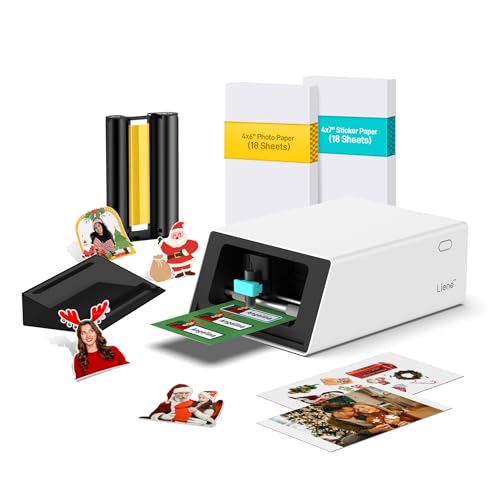
PIXCut S1 integrates high-resolution printing with precise die-cutting in one device, streamlining sticker production. Bluetooth connectivity enables editing and cutting from a smartphone, and the AI image extraction feature helps isolate subjects for clean edge cuts. It delivers 300 DPI color prints with a wide color range for vibrant stickers, labels, and small decals. This all-in-one solution minimizes setup time and is ideal for crafters who want professional-looking results quickly.
Phomemo Bluetooth Thermal Label Printer 241BT

This compact shipping label printer focuses on fast, black-and-white label printing via Bluetooth or USB. It supports label widths from 1 to 4.6 inches and is suitable for organizing product labels, small-scale shipping labels, and inventory tags. The device is designed for mobile and desk usage, offering a straightforward workflow for businesses that need reliable, low-cost label printing without color requirements.
JOYEZA Premium Printable Vinyl Paper for Inkjet Printers

These matte printable vinyl sheets are designed for inkjet printers and dry quickly for faster sticker production. They are water-resistant when sealed with a UV sealer spray and are compatible with both indoor and outdoor label projects. The thick, matte surface provides a professional finish that suits product labels, wall decals, and custom stickers. The backing makes peeling easy and cutting straightforward for DIY projects.
LIKCUT Vinyl Cutter Bundle with Carrying Case

The Likcut bundle provides a ready-to-craft ecosystem with a dedicated carrying case, cutting mats, transfer tape, vinyl rolls, and more. The cutter features a robust blade and a simple touch-panel interface with built-in templates, making it suitable for quick sticker projects, home decor, and classroom use. It supports several vinyl types and sizes, enabling versatile design possibilities and reliable edge cuts for crisp sticker shapes.
Buying Guide: Key Purchase Considerations For Vinyl Stickers
- Intended use: Separate needs exist for high-volume label printing versus precise cuttings, such as decals or stickers. Choose between an all-in-one printer (for colorful sheets) and a dedicated cutter (for precise shapes).
- Print quality vs. cutting accuracy: For vibrant label designs, prioritize printers with high DPI and color accuracy. For stickers requiring precision, select cutters with reliable blade performance and edge accuracy.
- Media compatibility: Ensure the device supports printable vinyl sheets you plan to use, and verify transfer methods and adhesives suitability for your surfaces.
- Connectivity: Bluetooth and USB options influence workflow flexibility. The right setup can save time when editing designs and exporting cut files.
- Cost of ownership: Consider ink/toner bottle costs or replacement blades, mats, and transfer tapes. Supertank systems can dramatically reduce ongoing ink expenses for large sticker runs.
- Software ecosystem: A user-friendly interface, compatible design apps, and Print-Then-Cut features can simplify complex sticker projects.
- Portability and space: If space is limited or mobility matters, compact cutters or portable printers may be preferable to bulkier all-in-one machines.
- Durability and warranty: Look for devices with solid warranties and readily available spare parts, especially for frequent, heavy use.
When selecting among these options, align features with your typical sticker workflow. If you regularly print colorful labels and need reliable cuts, an all-in-one printer with a compatible cutter accessory can be ideal. If your focus is precise, fast-cut stickers in small batches, a dedicated cutter setup paired with printable vinyl sheets may deliver better results. The items above represent a spectrum of capability to help you tailor a setup that fits your projects and budget.