Marble filament makes it easy to achieve stone-like finishes on 3D prints. This guide highlights top marble PLA options and explains who each is best for. Whether you’re crafting architecture models, sculptures, or decorative pieces, these picks balance texture, printability, and reliability for American hobbyists and professionals alike. The quick reference table below compares five strong choices at a glance.
| Product | Best For | Why Pick It | Notable Limitation |
|---|---|---|---|
| Casual to intermediate printers | Strong dimensional accuracy; easy feeding on standard 1.75 mm printers | Spool size may be large for compact printers | |
| Fine-detail pieces | Realistic marble texture; minimal visible layer lines | Requires careful storage to prevent moisture exposure | |
| Fast print projects | Very fast printing capability with solid marble texture | High-speed regime may sacrifice some surface perfection on simple geometries | |
| Architectural models | Veining and matte finish for depth; reliable feeding | May require tuning for optimal adhesion on some beds | |
| Large-scale decor and art | Authentic marble look with tough, low-warp material | Availability can vary by region |
ELEGOO PLA Marble Filament 1.75mm
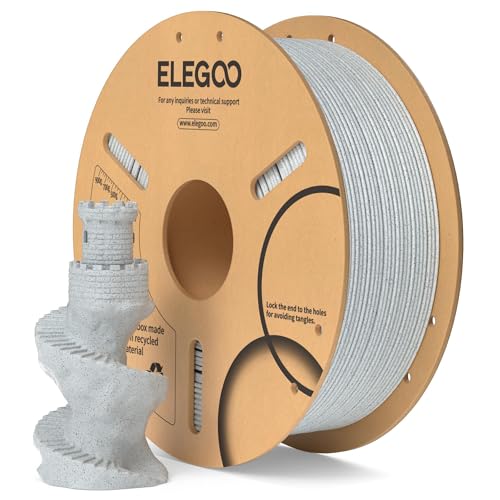
ELEGOO Marble PLA uses fine marble powder to deliver a stone-like finish suitable for busts, sculptures, and architectural models. It offers dimensional accuracy within +/- 0.02 mm, providing smoother, more stable prints on most 1.75 mm FDM printers. The filament is designed with a full mechanical winding and careful manual checks to reduce tangling and line breaks, with a larger inner spool diameter for easier feeding. Best for hobbyists who want realistic texture with straightforward printing. A potential limitation is the larger spool size, which may not fit every compact printer’s spool holder.
Geeetech Marble PLA Filament 1.75mm

Geeetech Marble PLA is a stone-like filament designed to deliver a realistic marble texture with hidden layer lines. It is described as easy to print, similar to regular PLA, and comes with automatic spooling plus manual checks to maintain neat winding and reduce tangles. This makes it a strong pick for detailed sculptures and models that benefit from a premium marble look. Choose this if you want bold texture without complicated printing steps. It may require attentive storage to prevent moisture-related issues that can affect print quality.
SUNLU High Speed Marble PLA Filament
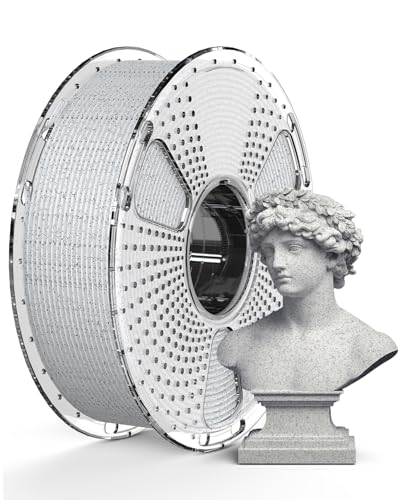
SUNLU’s High Speed Marble PLA is built for rapid printing, with speeds from 50 to 600 mm/s. It aims to increase printing efficiency while preserving the marble texture and finish. This is ideal for projects that require quick turnarounds, such as rapid prototypes or large decorative pieces. The main caveat is that very high speeds can sometimes impact surface smoothness on simpler geometries; proper tuning is essential to maximize quality at higher speeds.
OVERTURE Rock PLA Filament Marble

OVERTURE’s Rock PLA Marble aims to replicate authentic marble and natural stone textures with veining and a rough matte finish. It’s optimized for marble PLA applications like dioramas, architectural models, and decorative art. A practical benefit is its tangle-free spool and enhanced feeding to minimize interruptions. This filament is best for modelers seeking depth and a premium look. If you’re new to marble PLA, some printers may need bed adhesion adjustments to prevent lifting on larger prints.
SUNLU Marble PLA Filament Shadow Storm

SUNLU’s Shadow Storm marble PLA aims for a realistic stone veining and a matte finish, making it suitable for architectural models and decorative pieces. It’s designed to be easy to print, with a focus on consistent extrusion and low warping. This option is well-suited for larger prints where a natural marble aesthetic is important. A potential limitation is occasional regional stock variability that can affect availability.
Buying Guide: Marble PLA Filament Essentials
- Texture and appearance: Look for marble particles or veining descriptions that align with your project’s realism goals. Matte finishes tend to photograph and display best for architecture and sculpture.
- Dimensional accuracy: Filaments claiming tight tolerances (such as +/- 0.02 mm) typically deliver cleaner corner details and fit better with tight-fitting parts.
- Print settings and compatibility: Confirm your printer supports 1.75 mm filament and check bed temperature ranges and cooling needs. Marble PLA can be more prone to visible layer lines if cooling is insufficient.
- Spool design and feeding: A well-spooled filament reduces tangles and jams. A larger inner diameter helps feeding on printers with longer filament paths.
- Ease of use and consistency: Some brands emphasize automatic spooling and stricter quality checks to minimize tangling and weak spots.
- Application fit: For architectural models and dioramas, prioritize realism and texture. For decorative pieces, color and finish may drive the choice more than texture alone.
- Storage and shelf-life: Marble PLA can be sensitive to moisture. Store in airtight containers with desiccants to preserve print quality.
Frequently Asked Questions
- What is marble PLA filament? Marble PLA is a polylactic acid filament blended with marble-like particles or textures to imitate stone surfaces in 3D prints.
- Is marble PLA easy to print? Yes, it generally prints like standard PLA, but it may require careful cooling and bed adhesion for optimal results on larger pieces.
- Does marble filament hide layer lines? Some marble formulations reduce visible layer lines by infusing fine particles, producing a more continuous texture.
- Which marble PLA is best for large architectural models? Filaments with stable feeding and low warping—such as those described as tangle-free and with enhanced feeding—are advantageous for large prints with fine veining.
- How should I store marble PLA? Keep filament in a sealed, moisture-controlled environment to prevent moisture uptake, which can cause print defects.
- Can I use high-speed settings with marble PLA? Some brands advertise high-speed capabilities; test print a small model first to balance speed with surface quality.