Finding a beginner-friendly laser engraver that can handle wood with clear, precise results is essential for new users. This guide highlights five accessible models that balance safety, ease of setup, and solid performance for DIY enthusiasts and small workshops. Each option offers a compact working area, straightforward operation, and reliable results on wood, with additional capabilities for other materials. Below, explore a quick comparison and detailed product sections to help you choose the right laser machine to start your projects.
| Product | Brand | Laser Power | Working Area | |
|---|---|---|---|---|
| ACMER S1 Laser Engraver (3500mW) | ACMER | 3500 mW | 130×130 mm | High precision, beginner-friendly setup, versatile for multiple materials |
| ACMER S1 Laser Engraver (6000mW) | ACMER | 6000 mW | 130×130 mm | Higher power for thicker materials, quick results |
| Carverall K15 Pro 5W | Carverall | 5W | 200×300 mm | Real 5W power, broad material compatibility, quick setup |
| Woxcker L2 Flex 5W | Woxcker | 5W | Enclosed area varies by model | Full enclosure for safety, strong 5W capability |
| Creality Falcon 5W | CREALITY | 5W | 400×415 mm | Large working area, precise engraving, scalable for bigger projects |
The picks above emphasize safety features, ease of assembly, and reliable engraving on wood. Each model supports a range of materials beyond wood, while remaining approachable for beginners who want to build confidence before tackling more complex projects.
ACMER S1 3500mW: Entry-Level Precision

ACMER’s S1 3500mW model targets beginners who want dependable wood engraving with tight tolerances. Its 0.04 mm laser spot and 2 mm focal length enable crisp lines on wood and compatible materials like acrylic and glass. The machine delivers up to 10,000 mm/min engraving speed and a repeatable positioning accuracy of 0.01 mm, making it suitable for detailed personalized gifts and small business samples. Setup is streamlined, with a near-ready assembly that minimizes the typical learning curve for first-time laser users.
ACMER S1 6000mW: More Power For Tougher Jobs

The 6000mW variant from ACmer raises the bar for user projects that involve denser woods and thicker materials. With a 48W machine output and the same 0.04 mm spot size, it delivers strong performance for cutting thin plywood, MDF, and even some plastics. It remains approachable for beginners due to its preassembled design and simple head installation. This model suits hobbyists who want more versatility without moving into industrial-grade equipment.
Carverall K15 Pro 5W: Precision & Portability
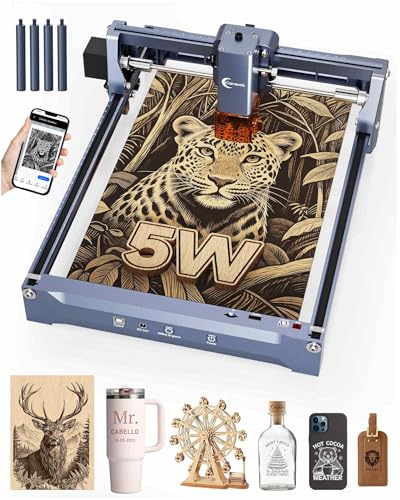
The Carverall K15 Pro combines a true 5W laser output with a compact 200×300 mm working area. Its 0.01 mm precision and high engraving speed (up to 15,000 mm/min) enable intricate jewelry, decor pieces, and detailed wooden designs. It emphasizes an easy 90-second setup with minimal hardware adjustments and broad software compatibility via CutLabX, LightBurn, and LaserGRBL. The kit includes safety glasses and test materials, making it well-suited for beginners seeking quick results without extra purchases.
Woxcker L2 Flex 5W: Enclosed Safety With Power

The Woxcker L2 Flex 5W model emphasizes safety through a 360° full enclosure, reducing exposure and containing fumes. It is ideal for beginners who prioritize a clean, controlled workspace while achieving 3–5 mm material cuts in MDF and similar substrates. The 0.01 mm engraving precision ensures detailed results on wood, leather, acrylic, and coated metals, making it a versatile starter option for hobbyists and small shops alike.
Creality Falcon 5W: Large-Scale Projects

Creality’s Falcon 5W model pairs a robust 5W laser with a generous 400×415 mm working area, enabling larger or multiple-piece projects in one pass. Its high-precision 0.06 x 0.06 mm engraving capability supports fine detail while maintaining fast throughput at up to 10,000 mm/min. The machine emphasizes offline usability and expandability with optional add-ons like a rotary roller and raisers, making it a strong choice for users planning bigger wood pieces, signs, or plaques.
Buying Guide: Key Considerations For Beginners
- Power vs. safety: Higher wattage expands cutting capacity but can increase risk. Look for enclosed designs or robust safety features to protect eyes and skin.
- Working area: Start with a compact 130×130 mm or similar for small crafts, then consider larger beds (200×300 mm to 400×415 mm) as your projects grow.
- Materials compatibility: Most beginner machines engrave wood well; verify compatibility with acrylic, leather, and coated metals if you plan to diversify.
- Ease of assembly and software: Preassembled units with straightforward head installation reduce the setup barrier. Check software compatibility with popular options like LightBurn or LaserGRBL.
- Safety and accessories: Look for safety glasses, test materials, and included maintenance tools. Enclosures help with dust, fumes, and noise.
- Upgrade path: Some models offer optional addons (rotary rollers, raisers) for expanding capabilities without replacing the unit.
- Speed and precision: A balance of engraving speed and 0.01 mm to 0.04 mm spot size yields crisper results on wood with reasonable project timelines.
- Community and support: Access to tutorials, user forums, and responsive support can significantly shorten the learning curve.
For beginners, choosing a model with a near-complete setup, safety features, and software flexibility can reduce the learning curve and deliver reliable results on wood projects. Consider your space, target projects, and whether you anticipate scaling up to larger boards or more frequent production when selecting a machine.