Leather crafting benefits from precise, reliable laser engravers that can etch intricate designs without scuffing surfaces. This guide highlights five top-rated laser cutters and engravers that perform well on leather, balancing power, accuracy, safety, and ease of use for beginners and seasoned makers alike. Below you’ll find quick-release summaries and in-depth product sections to help you compare options.
| Product | Brand | Key Strength | Engraving Area |
|---|---|---|---|
| Carverall K15 Pro | Carverall | True 5W power with ultra-precision | 200×300 mm |
| Creality Falcon 5W | CREALITY FALCON | High precision with 0.06 mm spot | 400×415 mm |
| LONGER Ray5 Mini | Longer | Low-weight portable design | 140×130 mm |
| LONGER Ray5 (5W) | Longer | 10,000 mm/min speed with 0.08 mm spot | 400×400 mm |
| ACMER S1 | ACMER | 3500 mW with compact footprint | 5.1×5.1 inches |
Carverall K15 Pro 5W Laser Engraver
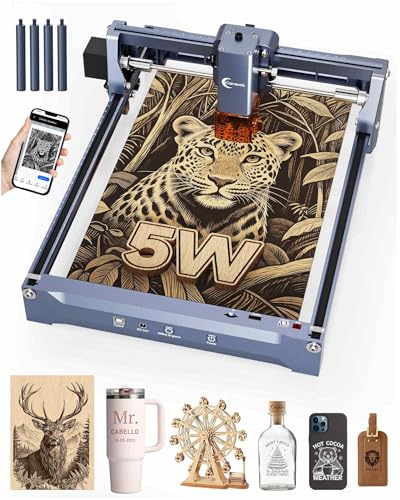
The Carverall K15 Pro combines a true 5W output with high-precision engraving at 0.01 mm for fine leather details. It supports a 200×300 mm work area and reaches speeds up to 15,000 mm/min, enabling clean cuts and crisp engravings on leather, coated materials, wood, acrylic, and metal. It’s designed for quick setup, with a lightweight frame and a focus on a safe, beginner-friendly experience. The bundled CutLabX app compatibility across major platforms, along with safe operation tools, makes it a practical choice for hobbyists and small studios.
Creality Falcon 5W Laser Engraver

Creality Falcon offers high-precision engraving with a 0.06×0.06 mm spot, delivering fine leather patterns and detailed cuts within a 400×415 mm workspace. The device features a robust 32-bit controller enabling engraving up to 10,000 mm/min, which supports efficient processing of leather designs and larger runs. Optional add-ons such as a rotary roller and risers expand the range for cylindrical or raised leather projects, increasing versatility for bands, wallets, and decorative panels.
LONGER Ray5 Mini Laser Engraver

The LONGER Ray5 Mini emphasizes portability and ease of use, weighing about 1.8 kg with a compact 140×130 mm engraving area. It delivers 0.04 mm x 0.04 mm laser precision and speeds up to 12,000 mm/min, making it suitable for leather engraving and small-scale prototyping. A protective eyewear set and emergency stop button support safe operation, while its pre-assembled design minimizes setup for beginners who want to start right away.
LONGER Ray5 5W Laser Engraver

The Longer Ray5 5W offers a 0.08×0.08 mm laser spot and 0.01 mm engraving accuracy across a 400×400 mm area. This balance of power and precision is well-suited for leather projects requiring fine line work, shading, or intricate cutouts. A 240 MHz ESP32-based controller supports rapid processing, while the large workspace accommodates larger leather pieces and multiple items in a single session.
KENTOKTOOL LE400PRO 50W Laser Engraving Machine

The KENTOKTOOL LE400PRO pairs a high-power 50W system with ultra-fine focusing at 0.08 mm and a robust all-metal frame. It is designed for precision engraving and cutting across leather, metal, glass, and more. The device emphasizes eye protection with a magnetic cover, straightforward tool-free focus adjustment, and solid reliability for both beginner and professional workflows. The compact footprint supports workshop setups where leather projects sit alongside other materials.
Buying Guide: Leather Laser Engraving And Cutting Considerations
- Power and material compatibility: Leather projects often benefit from mid-to-high power for clean cuts and deep engravings. Consider devices offering 5W to 10W ranges for leather, ensuring the machine can handle thickness without scorching edges.
- Engraving area vs project size: If you work on wallets, belts, or larger leather pieces, choose a machine with a bigger working area. Smaller units are excellent for tags, small decor, or sample designs.
- Laser spot size and precision: A smaller spot size yields finer detail. Look for spot sizes around 0.04–0.08 mm for crisp lines and delicate shading on leather surfaces.
- Software and compatibility: Ease of use matters. Apps like LightBurn or LaserGRBL support many devices. Some models include cross-platform apps and offline capabilities, which can simplify workflows for beginners.
- Safety features: Eye protection, enclosed housings, auto-stop lids, and emergency stops are important, especially for home studios. Verify that safety standards and protective gear are included.
- Materials and finishing: Leather engravings can be sensitive to heat. Before committing, test on scrap leather to confirm edge quality, color change, and any potential burn marks.
- Setup and maintenance: Pre-assembled units save time, while modular designs allow upgrades. Consider the availability of spare parts, replacement lenses, and software updates.
- Noise and ventilation: Some laser systems can be noisy or generate fumes. Plan for adequate ventilation or smoke purifiers if your workspace is not well-ventilated.
- Budget and reliability: Higher power machines tend to be more robust but cost more. For leather, a balance of power, speed, and reliability is ideal to sustain ongoing projects.
- Community and support: A strong user community and accessible customer support reduce downtime and speed up learning, especially for leather-specific techniques like pyrography-style shading and textile-like finishes.