You can design your own temporary tattoo by printing artwork onto temporary tattoo paper, using a tattoo-making kit, or ordering a custom-printed design. Printable sheets are best for people who want control over their artwork and multiple designs; a dedicated printer kit suits kids who want an activity; and custom-printed sheets are better when you want a finished design without printing it yourself. The options below compare those approaches and their key limitations.
| Option | Best For | How You Customize |
|---|---|---|
| Welacer Tattoo Paper | At-home inkjet printing | Print images, text, or artwork |
| Jecqbor Tattoo Paper | DIY designs with included instructions | Print and transfer from two sheets |
| BubblePop! Tattoo Paper | Water-resistant DIY designs | Print on blank sheets |
| Hello Blink Tattoo Printer | Kids’ creative projects | Use a thermal printer and app |
| InkWear Custom Sheet | Ready-made custom artwork | Upload a design, logo, or text |
Welacer Printable Tattoo Paper

Welacer is best for people who want to create designs on a computer or other device and print them at home. The listing describes eight 8.5-by-11-inch sheets for inkjet printers. It says to print on the tattoo paper, apply the clear adhesive sheet, cut out the design, and transfer it to skin.
Choose this option if you want to work with your own images, text, or artwork and prefer having multiple sheets for projects or events. The product is described as suitable for parties, holidays, cosplay, and family crafts. Limitation: It is made for inkjet printers, so it is not the right choice if you only have a laser printer.
Jecqbor Two-Sheet Transfer Paper

Jecqbor is best for DIY users who want a paper set with a described transfer process. Its six 8.5-by-11-inch sets include printing paper and transparent adhesive paper, along with user guides. The instructions say to print the design, cover it with the adhesive sheet, cut it out, then press it onto skin with a wet towel or foam for 30 to 60 seconds.
This is a useful choice for personal photos, patterns, or text for gatherings, costumes, and gifts. The listing also explains removal with an oil-based product. Limitation: This product is specified for inkjet printers; check your printer type before choosing it.
BubblePop! Printable Tattoo Paper
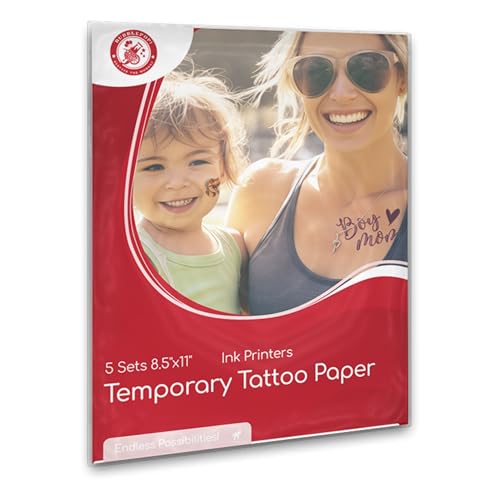
BubblePop! is best for inkjet-printer users who prioritize water-resistant designs. The listing describes five blank 8.5-by-11-inch sheets for custom tattoos, with use cases including parties and cosplay. It also says the tattoos are removable with baby oil.
Choose this paper if you want to print your own artwork and want the product listing to specifically identify water resistance as a feature. As with other printable options, you can make a design digitally before printing and cutting it out. Limitation: The listed use is for inkjet printers, and the product does not include a custom design service.
Hello Blink Tattoo Printer Kit
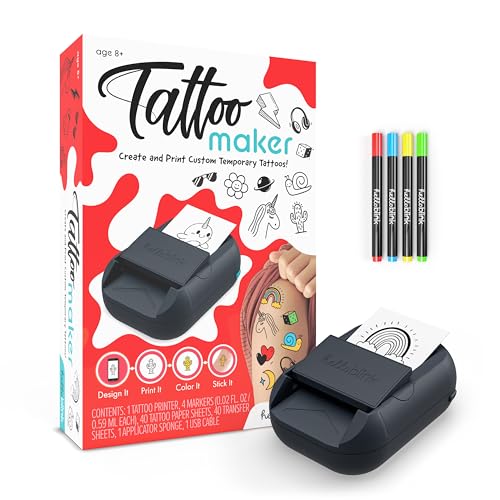
Hello Blink is best for children and families looking for a guided tattoo-design activity rather than a standard inkjet-paper workflow. The kit uses thermal, ink-free printing and includes a printer, four markers, tattoo paper, and transfer sheets. Its free app offers a gallery of images for design ideas.
This option was selected because the printer and app-based process provide a dedicated way to explore custom body-art concepts. The listing identifies it for ages 8 and up. Limitation: It relies on the Hello Blink app and included system, so it is less suited to someone who simply wants to print arbitrary artwork using an existing inkjet printer.
InkWear Custom Temporary Tattoo Sheet

InkWear is best for buyers who already have a design but do not want to print and assemble tattoos at home. The listing says you can upload artwork, a logo, a photo, or text for a custom A4 sheet. It allows a large tattoo, several smaller tattoos, or repeated designs across the sheet.
Choose this service for event favors, teams, parties, or testing a tattoo concept before considering permanent ink. The listing describes the finish as matte and realistic and says custom orders are dispatched the next day. Limitation: This is a custom-printed product, not blank paper for repeated home design experiments.
Buying Guide: How To Choose A DIY Tattoo Method
Do you want to print at home or upload a design?
Printable paper gives you more control over revisions and lets you prepare designs using your own software or images. Confirm printer compatibility before buying: the Welacer, Jecqbor, and BubblePop! options are described for inkjet printers. A custom-print service like InkWear is better if you want someone else to produce the sheet from your submitted artwork.
What should you check before applying a tattoo?
Read the product’s application and removal instructions before use. Cut close to the design to limit excess clear film, and follow the specified transfer steps. Avoid applying a product to irritated or broken skin. If you have sensitive skin or concerns about an ingredient, review the product information and consider seeking professional advice before use.
Which option works for kids?
Hello Blink is listed for ages 8 and up, while the printable papers are presented for family, kid, or craft use. Adult supervision can help with printer operation, cutting, and application. Choose based on whether the child wants an app-based printer activity or a project using artwork printed on sheets.
Frequently Asked Questions
Can I design a temporary tattoo with my own picture?
Yes. Printable tattoo paper listings describe using your own images or photos, and InkWear accepts uploaded photos or artwork for a custom sheet.
Do I need a special printer for printable tattoo paper?
The Welacer, Jecqbor, and BubblePop! papers are described for inkjet printers. Check the specific product instructions and your printer type before printing.
How do I transfer a printed temporary tattoo?
Follow the paper’s instructions. For Jecqbor, the listed process involves covering the print with adhesive paper, cutting it out, and pressing it onto skin with a wet towel or foam.
How can I remove a temporary tattoo?
Removal methods vary by product. Jecqbor lists oil-based products, while BubblePop! recommends baby oil. Follow the instructions supplied with the tattoo material.
Which option is easiest if I do not own an inkjet printer?
Consider a custom-printed sheet such as InkWear or a dedicated printer kit such as Hello Blink. Check each option’s design-submission or setup requirements before ordering.