Art projection devices help artists trace designs, transfer images, and refine details with precision. The following selections are designed for tracing on a range of surfaces—from canvases to whiteboards—while offering user-friendly drawing apps, reliable focus, and versatile connectivity. This guide highlights five options that blend clarity, portability, and thoughtful features to support both beginners and seasoned creators.
| Product | Brand | Key Features |
|---|---|---|
| Caydo P1 Art Projector | Caydo | Exclusive drawing app, 4K support, auto focus, 100″ display, iOS/Android compatibility |
| GIKUCNZL Drawing Projector | GIKUCNZL | Dual-use for tracing and projection, 4K support, multiple connectivity options |
| Caydo M1C Art Projector | Caydo | Rechargeable, exclusive drawing app, 4K support, 100″ display |
| Caydo P3 Art Projector | Caydo | Exclusive drawing app, auto focus, keystone correction, 40″-120″ projection |
| Flycatcher Smart Sketcher 2.0 | Flycatcher | Educational content, Bluetooth app integration, 180+ activities |
Across these options, look for features like built-in drawing apps, fast auto focus, adjustable projection sizes, and flexible connectivity. The best choice depends on your workspace, device ecosystem, and whether you mainly trace on paper, canvas, or chalkboards. Below are five detailed product sections that summarize what each device can do for tracing and drawing projects.
Caydo P1 Art Projector With Drawing App

The Caydo P1 combines LED projection with a dedicated drawing assistant to streamline tracing and sketching. It projects onto walls, easels, blackboards, or whiteboards, enabling tracing of designs, photos, and reference images. The device supports multiple screen mirroring options—Eshare, AirPlay, and MiraCast—so you can transfer images even without a robust internet connection. The built-in drawing app features flexible zoom, 360° rotation, full-screen mode, and grids. There are three background colors—black, grey, and white—and four drawing modes: Gridify, Sketchify, Comicize, and Monochromize. A remote control button provides quick access to features for smooth workflow. The projector is designed to work with iOS and Android devices.
Key considerations: It offers 4K compatibility in content playback and a 100″ display size, which is ample for large-scale tracing tasks. Users should verify compatibility with their preferred devices and ensure the remote control remains handy during long sessions. The auto focus and keystone features help maintain proportion and alignment as you move the projector from surface to surface.
GIKUCNZL Drawing Projector For Tracing
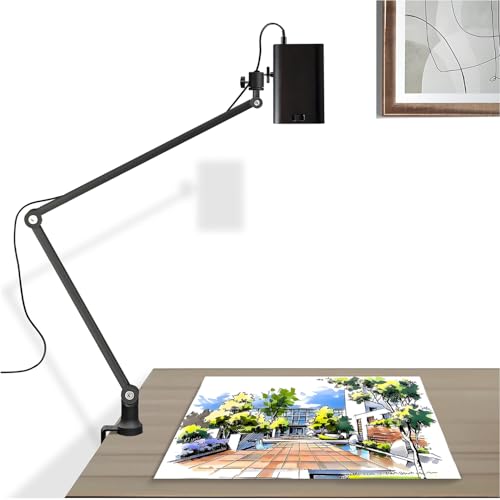
This dual-purpose projector is well-suited for tracing onto canvases or desktops and also doubles as a high-performance movie or presentation projector. It supports a projection size up to 10.5 feet, making it suitable for large artwork sessions. The device delivers 1280×720 physical resolution with 4K support and HDR clarity for crisp, vivid images on screens of various sizes. Connectivity options cover wireless and wired screen mirroring, enabling easy pairing with smartphones, tablets, laptops, and gaming consoles. This versatility helps artists move from tracing references to multimedia demonstrations in a single setup.
Key considerations: The 720p native resolution with 4K support may favor detailed tracing when paired with high-quality source images. Users should assess the brightness and color accuracy in their typical environment and confirm that the device’s projection distance aligns with their workspace dimensions. The ability to connect across devices broadens use cases beyond tracing alone.
Caydo M1C Art Projector

The Caydo M1C emphasizes portability and a rechargeable design, supporting a wide range of tracing and decorative tasks. The built-in exclusive drawing app includes zoom, rotation, and grid tools, along with three background colors and four drawing modes: Gridify, Sketchify, Comicize, and Monochromize. This model highlights flexible projection options and seamless image transfer without constant internet reliance. With 4K content compatibility and a bright, clear image, it serves artists who want on-the-go tracing capability or a compact studio solution for canvas work and decorative projects.
Key considerations: Rechargeability is a plus for desk setups or field sketching. Consider battery life during longer sessions and the app’s feature set to ensure it aligns with your tracing style. The 100″ display is appealing for large designs, but ensure the projection distance fits your space and that the device’s keystone correction handles your wall geometry effectively.
Caydo P3 Art Projector With Drawing App

The Caydo P3 offers 1080P HD projection with 400 ANSI lumens for bright, color-rich images suitable for tracing and reference viewing in semi-lit spaces. Its built-in drawing app supports zoom, rotation, full-screen activities, and 3×3 grids, with three background colors and four drawing modes—Gridify, Sketchify, Comicize, and Monochromize. Auto focus and keystone correction ensure sharp images quickly, with a projection range from 3.6 feet to 8.7 feet. It also supports 4K video playback and promises a long lamp life of 30,000 hours, making it a robust option for steady tracing and repeated use.
Key considerations: Auto focus and keystone correction simplify setup, but the brightness of 400 ANSI lumens should be evaluated against room lighting. The 3.6–8.7 ft throw distance should match your typical workspace. The 4K playback capability is beneficial for high-resolution reference images used in tracing projects.
Flycatcher Smart Sketcher 2.0

The Flycatcher Smart Sketcher 2.0 focuses on educational value and creative development for kids and beginners. It comes with a complete bundle that includes drawing projects and framed display-ready artwork, which can help young artists build confidence in tracing and freehand drawing. The device supports Bluetooth app connectivity, offering access to extended content, interactive tutorials, and personalized draws. A library of over 60 pre-loaded images provides immediate tracing material, enabling progressive skill-building as children explore new subjects and styles.
Key considerations: Consider the age and goals of the user. The app ecosystem and bundled content appeal to families and classrooms seeking a screen-free drawing activity. If you require professional-grade tracing accuracy or high-resolution projection for detailed artwork, you may prefer devices with higher native resolution and larger projection capabilities.
Flycatcher Smart Sketcher 2.0 Bundle
This 4-in-1 bundle from Flycatcher includes the smART Sketcher 2.0 projector, the Under the Sea and Jungle Animals creativity packs, plus framed paper for showcasing finished art. The bundles emphasize educational value—improving fine motor skills, hand-eye coordination, and creative confidence in a screen-free setting. For parents and educators, the bundle provides a structured path to develop drawing skills while maintaining a playful, exploration-driven approach. It is a practical choice for households or classrooms prioritizing interactive learning and durable, long-term use of tracing tools.
Buying Guide: Key Purchase Considerations
When choosing an art projector for tracing, consider the following factors to balance performance, cost, and practicality:
- Projector brightness and image quality: If you work in bright rooms, prioritize higher ANSI lumens and native resolution. 4K support is beneficial for feeding high-resolution reference images into a projector that can display them clearly.
- Focus and keystone performance: Auto focus and keystone correction save setup time and ensure accurate proportions as you move the projector. Look for quick focus times and reliable alignment across different surfaces.
- Drawing apps and workflow tools: Built-in drawing assistants, zoom, rotation, grids, and background color choices can streamline tracing. Confirm app compatibility with your smartphone or tablet OS and whether you can customize drawing modes.
- Projection size and distance: Verify the maximum projection size and the throw distance to ensure it fits your workspace. A larger display is helpful for tracing large designs, while a compact option can be ideal for small studios.
- Connectivity: Wireless and wired options matter for transferring images without disruptions. Screen mirroring and direct image transfer can reduce setup time during sessions.
- Portability and power: Rechargeable models are convenient for sketching on the go, but consider battery life and the weight if you plan to move the device frequently.
- Usage scenarios: Distinguish between tracing-focused use (stability, accuracy) and multimedia needs (video, presentations). Some devices are designed primarily for art tracing, while others aim to be all-in-one projectors.
- Durability and lamp life: A longer lamp life lowers long-term maintenance costs. Look for models with robust warranty coverage or readily available replacement parts.
In sum, the best art projector for tracing depends on your workspace, preferred surface, and whether you value features like built-in drawing apps, portable power, or classroom-friendly bundles. The five options reviewed here provide a spectrum of capabilities—from professional tracing with auto focus and 4K support to kid-friendly bundles that pair learning with hands-on creativity. Consider trying a model that balances projection quality, app features, and ease of use to support your artistic tracing workflow.